

Just as with on-site website optimisation, the content of an online store also needs to be optimally adapted to search engine requirements.
The key SEO elements of an online store are:
- Meta title
- Meta description
- Product description
- URL
Optimising an online store for Google
We can surely all agree that the goal is to rank your online store above the competition on Google. SEO optimisation of an online store is the right approach to raising your store’s position in search results. As a result, traffic increases and, with a good user experience, so do sales. First, we need to take care of on-page optimisation of the online store. But before you start changing the content on the site, research keyword phrases and analyse your competition. The wrong approach and targeting the wrong keywords can lead to a loss of quality traffic (potential customers).
Prepare a strategy and a list of keywords for optimising your store based on analysis and research!
We define the optimisation strategy and choose keywords based on a Google analysis, taking into account relevance, search volume and keyword difficulty compared to the competition. The analysis determines:
-
- The actual position of your store or website compared to your competition.
A report on the actual search engine position for keyword phrases and a comparison with the competition. - We check the current landing pages
If the optimisation is for an existing store, we check the landing pages for each keyword phrase. - Determining difficulty
For each keyword phrase, we estimate how much effort it will take to overtake the competition. - Keyword reach
Shows what percentage of clicks a page gets depending on its position in the search engine.
- The actual position of your store or website compared to your competition.
Order an analysis
Price: from €390
- Installing the interface in the OpenCart online store
- Configuring the interface
- Testing the interface
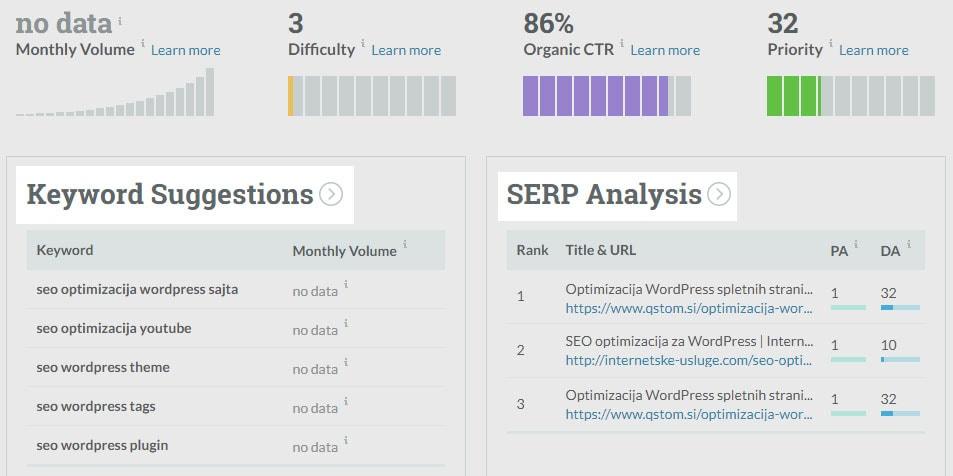
If you want to analyse and research keyword phrases yourself, use competitor analysis tools such as Ahrefs or MOZ. The easiest way to choose keyword phrases is with Keyword Explorer and Google Keyword Planner.
A report on your store’s SEO elements!
We prepare a list and an assessment of the on-site elements of your online store that affect your Google ranking.
SEO settings in an online store
A sense of security is extremely important to shoppers today. Online, the SSL protocol (Secure Sockets Layer) is now a standard in web design and development. It is a cryptographic protocol that enables secure communication on the web. Many older websites and stores do not have it, so it is a good idea to add it. When building new websites, SSL is essential. The security SSL gives shoppers can be the deciding reason for them to buy from you.
Meta title
In most cases, store owners enter the same text in the Meta title field as in the product name, which is wrong from the point of view of product page optimisation! The meta title is one of the most important elements of an online store, because it defines the page title. It is the most visible element in Google results and is therefore very important for store optimisation. The meta title should make it clear to shoppers what you sell and persuade them to click the link
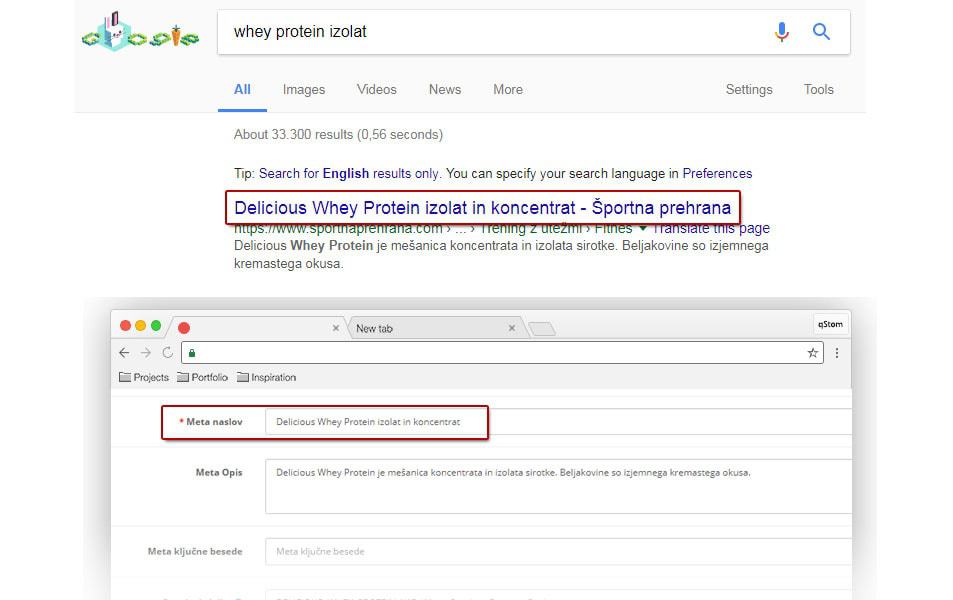
In meta titles:
- Use the keyword, but keep the title an accurate and concise description of the page content. DON’T list keywords in the title, and DO write the title so that it tells shoppers what to expect when they click the search result.
- Put the keyword at the beginning of the product or category meta title.
- If it is a well-known brand, add it to the title.
- The meta title should be 50–60 characters long.
- Meta titles must not be repeated: write a unique title for every product, category and so on.
- The product title must match the actual content/description of the product in your online store.
Meta description
The meta description gives the search engine a short description of the product or category content. Search engines most often show this text below the page URL, and it also affects online store optimisation.
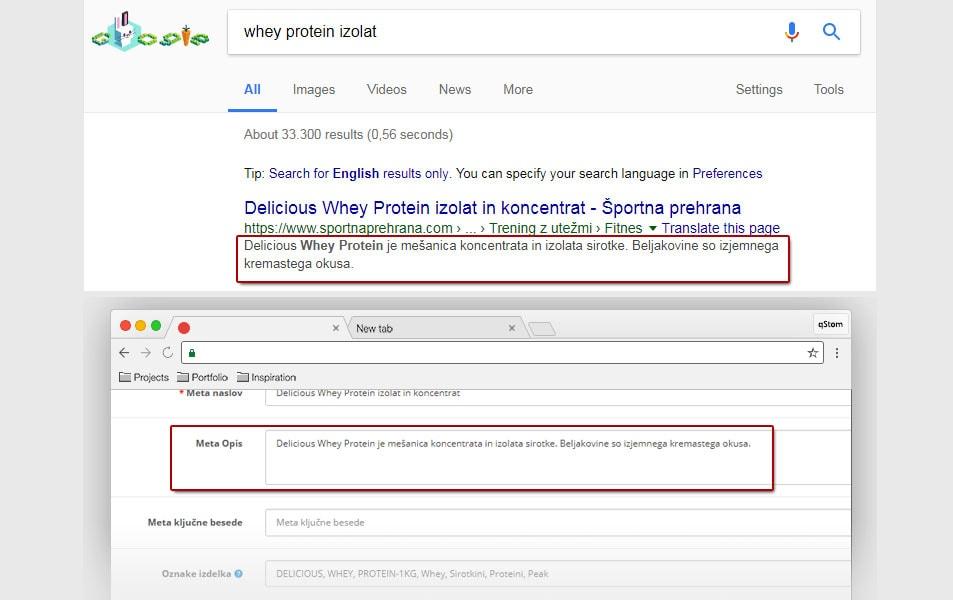
Meta description:
- The meta description should contain the keyword at the beginning of the text.
- The short description of a product or category should be between 140 and 160 characters long.
- The text should make sense and summarise the page content.
- Write an enticing meta description and include a call to action.
- DON’T list keywords or their variations.
- Meta descriptions should be unique.
Product description – page content
Before buying, a store visitor wants as much information as possible about the product they are interested in. Online store optimisation makes it easier for Google to offer users the highest-quality and most relevant content for their search query.
To do business successfully online, we need to turn store visitors into customers. The first step in this process is quality, clear content that takes the shopper from the information stage, through enthusiasm, to trust and the purchase of a product or service. Besides the classic product presentation in the store, we also need content marketing that encourages visitors to browse the online store.
What a product content page should include:
- Product information should be high quality and written so that the product page is easy to read on mobile phones too. Include the keyword in the first paragraph.
- The product description should be as unique as possible (don’t copy content from other sites: write and format it in your own way).
- Highlight the product’s strengths in “bold” text.
- Include graphic elements that liven up the page and give visitors quick visual information.
- The product page should not be too long. For marketing content, use an integrated blog or CMS pages.
- Create internal links to the manufacturer’s page and to complementary or related products.
- If you link directly to the product manufacturer, add the HTML attribute target=”_blank”. The manufacturer’s page will then open in a new browser window.
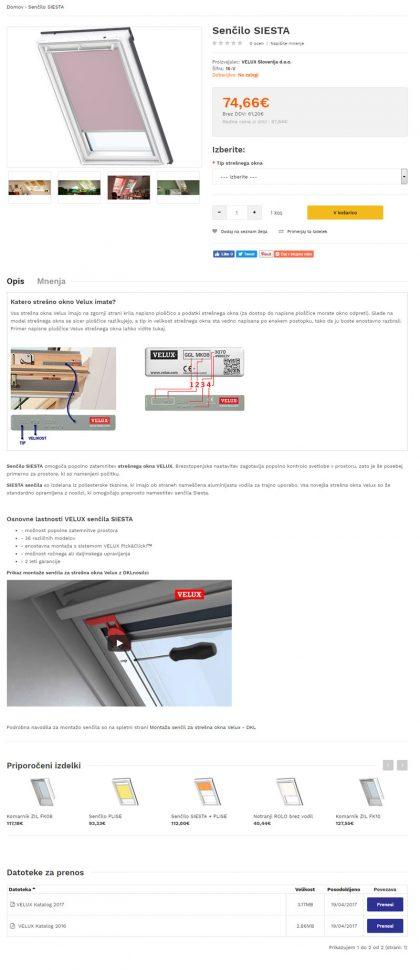
- Adjust the product’s H1 heading (SEO Heading Title) so that it is SEO-friendly. Example: Velux roof window blind – Siesta
- Use the H2 HTML tag to highlight sections (e.g. “Features of the Velux Siesta blind“).
- Choose attractive images optimised for the web. In the SEO ALT Images field, enter the product name including the keyword. Example: Siesta roof window blind
- SEO Title Images is the text shown when you hover the mouse pointer over an image. It should contain the keyword, and you can also add a call to action, e.g.: Siesta blind for Velux roof windows
- If there are additional documents for the products (user manuals, catalogues and so on), attach them to the product page. Include the product name and keyword in the document names.
URL
The SEO URL is the address where your product or category is located. Well-structured product and category URLs form the site’s tree structure. Google shows the URL between the meta title and the meta description.
By optimising an online store, we try to convince Google that our site has the best answer for the search query. This trust is built slowly, and Google records in its archives a network of URLs linked to our site. When they stop selling a product, many online stores delete the product page completely, which is bad for store optimisation. You lose SEO value, and visitors get a 404 error message.
There are several solutions, and the most suitable one should be chosen together with the store owner.
Permanent 301 URL redirect
If the old product has been replaced by a new model, we recommend a permanent redirect from the old URL to the URL of the new model. This tells Google that we want to replace the old product with the new one, and the SEO value is preserved.
Redirect to the parent category
The main purpose of this solution is to redirect visitors to the parent category so that the store does not show them a 404 error page. If you cannot redirect visitors to a new or replacement product in the store, send them to the parent category.
Permanently deleted page
If you are sure you want to remove the product page permanently and you have no replacement products to offer visitors, you can delete the product page completely. Mark the URL with status code 410, which tells Google that the product URL has been permanently removed and will never be used again.
Use the existing URL – recommended solution
Product descriptions have informational value for existing customers or visitors who want to learn more about the product. Disable the purchase option on the product page and offer visitors the new model or other alternative products.
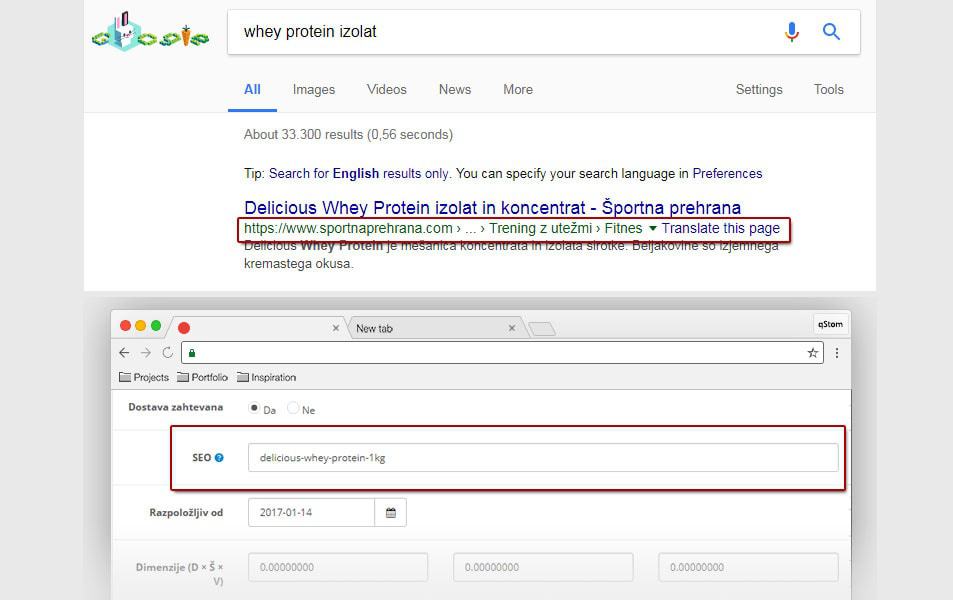
What to watch out for with URLs:
- Include the keyword.
- The URL must be meaningful and readable.
- The optimal URL length is up to 5 words (< 90 characters).
- Structure URLs logically for the online store: category/subcategory/product.
- Be sure to set up canonical links in the online store.
- URLs should NOT contain special characters, diacritics or spaces (replace them with “-” or “_”).
WARNING!
If this is an existing online store that Google has already indexed, or you have quality links from other websites, you must set up proper 301 redirects.