
Fake registrations and SPAM sent through contact forms are among the most common problems in OpenCart stores. They are caused by automated bots that load the server and pollute the customer database. The simplest protection is a correctly configured Google reCAPTCHA module.
create fake accounts and send SPAM
protection without clicking “I’m not a robot”
free assessments per month in Google Cloud
old keys without a Google Cloud project no longer work

Why are bots a problem?
Bots running automated scripts:
- register fake user accounts
- send SPAM through contact forms and reviews
- load the server with mass requests
- reduce customer trust and distort analytics data
Google reCAPTCHA analyses visitor behaviour and stops suspicious scripts from submitting a form, without making it harder for real customers to buy.
Setting up Google reCAPTCHA in OpenCart
- Get the keys In the Google reCAPTCHA console, create a key for the store domain (we recommend reCAPTCHA v3 or v2 “I’m not a robot”) and save the Site Key and Secret Key.
- Update the module In the admin panel, open Extensions → Extensions → Captcha and check that the Google reCAPTCHA module is up to date.
- Enter the keys Click Edit, enable the module and enter the Site Key and Secret Key.
- Choose the forms In the Pages tab, choose which forms are protected. Don’t overdo it: overly strict protection can flag a real customer as SPAM.
- Enable it in the store In System → Settings → your store → Option tab, select Google reCAPTCHA under Captcha.
- Test it Create a test account, send a message through the form and check that everything works.
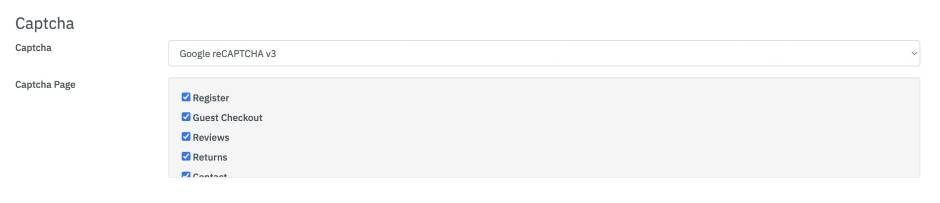
reCAPTCHA in Google Cloud
Google has moved classic reCAPTCHA keys into Google Cloud projects. The automatic migration started at the end of 2025 and was completed in the first quarter of 2026; since then, keys without a Google Cloud project no longer have API access. Existing keys on the site keep working without code changes.
Note: the first 10,000 assessments per month are free. If the store exceeds this limit and billing is not enabled in the Google Cloud project, reCAPTCHA returns an error for new requests. For larger stores, check usage and billing settings.
Common problems and solutions
| Problem | Solution |
|---|---|
| “Invalid Site Key” or “Invalid Secret Key” error | Check both keys and the domain in the reCAPTCHA console. |
| reCAPTCHA does not appear on the form | Check that the module is enabled in Extensions → Captcha and selected in the store settings (Option tab). |
| Does not work with the store theme | Check the theme’s compatibility with the module, or give us a call. |
Having trouble with SPAM?
We review your OpenCart store’s protection, update reCAPTCHA and set up the keys in Google Cloud.
Source: Google Cloud – reCAPTCHA Classic to reCAPTCHA Enterprise migration overview. Updated 3 Nov 2026.