
Around 250 infected messages received daily in Slovenia
Optimising WordPress with the Yoast SEO plugin
A website’s SEO optimisation matters because it affects how well our site or store ranks in search results. The better the SEO optimisation, the higher we appear in Google, Yahoo and Bing results.
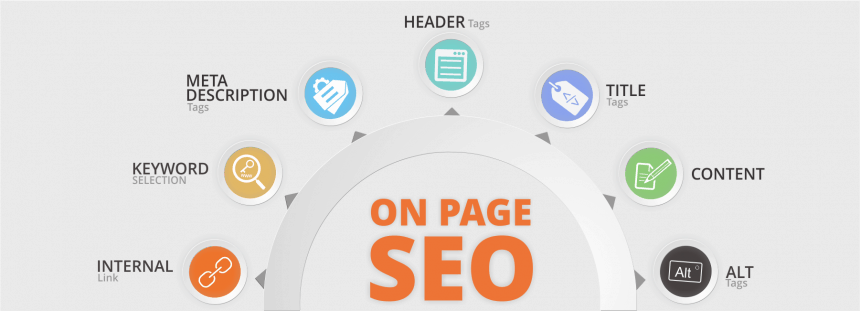
On-site SEO optimisation means designing a website so that search engines and users can understand it as easily as possible.
For your website to reach the TOP positions in search engines, it needs optimised content and HTML source code. Only then will you meet the recommendations and guidelines of modern search engines such as Google, Yahoo, Bing and others. Content is clearly the critical point without which online success is impossible. But what if, despite successful “off-site” optimisation (getting relevant links from other relevant websites and social networks), the website simply does not achieve the desired results?
You need to check the “on-site” SEO optimisation of the source code
On-site optimisation of a page’s HTML source code helps search engines index and interpret the page content, so they can rank it correctly in their index. Modern search engines can clearly tell whether a website is user-friendly and helpful on a given device, depending on where the search query was entered. A well optimised website helps search engines understand what information, and in what form, a visitor will get if they visit your website. Google and other search engines aim to send people to high-quality content related to their search query (keyword).
The most common on-site SEO errors and their impact on your Google position
We list the main on-site factors that can hurt a website’s SEO optimisation and your visitors’ user experience. Order a website or online store analysisto uncover the errors on your website. We carry out a professional technical audit with advanced tools and methods, and the analysis report also includes instructions on how to fix the errors.
Indexing and crawlability
indexing and crawlability
Leading search engines such as Google, Bing, Yahoo! and others use web crawlers to discover pages suitable for search results. Crawlers scan web pages, store the information they contain along with links to other documents, and save them in a database of indexed pages (documents).
4xx error – page not found
4xx status code
Pages with 4xx errors can appear on your domain. To earn an excellent reputation with users and search engines and a firm top position, all of your website’s resources and links must be error-free.
NOTE:
In some cases (especially with older and slower websites), your pages may return a 4xx or 5xx error simply because the server could not process the request in time during testing.
When testing, you can rule out this type of error by reducing the number of requests per second sent to the server.
Not finding any 4xx pages yourself is no guarantee that users or search engines won’t have trouble navigating your website. Make sure all resources are available and load correctly in the page code. Also check the pages on your domain for 5xx errors and make sure your 404 page is set up correctly.
Impact on SEO
4xx errors often point to problems on a website. If a URL is incorrect or links to a page that does not exist, the browser will show a 4xx error. It is important to monitor these errors regularly, investigate their causes and fix them! 4xx errors hurt page optimisation and lower your domain’s authority in the eyes of both users and search engines.
Redirects
redirects
Redirects on a website send users and search engines to a new page (e.g. when a page URL changes). There are several types of redirects, but the most important for SEO are 301 and 302 redirects.
301 redirect
301 redirect
Check the list of 301 redirects and make sure all of them are appropriate and set up correctly.
Even if all your 301 redirects are set up correctly, that doesn’t mean there are no other questionable redirect elements on your website. Make sure you aren’t losing visitors because of incorrect redirects. Also check for pages with 302 redirects, pages with meta refresh and pages with rel=“canonical”.
Impact on SEO
301 redirects are permanent and are usually used to solve duplicate content problems or when URLs are no longer needed. Using 301 redirects is perfectly acceptable for SEO, because a 301 redirect sends all traffic from the old page to the new one. Make sure 301 redirects point from the old URL to the most relevant new page.
Pages with a canonical link
pages with rel=”canonical”
Check the list of canonical links and make sure your rel=“canonical” meta tags in the page head or rel=“canonical” URL links are set correctly.
Also check pages with 302 redirects and pages with meta refresh tags.
Impact on SEO
In most cases, duplicate URLs are handled with permanent 301 redirects. When, for example, the same product appears in two categories with two different URLs, you need to specify which page search engines should treat as the main one and include in their index. You do this with the rel=“canonical” tag. The canonical tag must also be included correctly in the page head.
Coding and HTML factors
HTTPS pages with mixed content: links to insecure resources
HTTPS pages with mixed content issues
Some secure pages (HTTPS) display content from insecure (HTTP) sources. Most often this is content (images, videos, styles, scripts and so on) loaded on your page over an insecure HTTP connection. Review the list and try to fix all content on your pages.
Besides mixed content errors, there are many other factors to check so that your website works correctly over secure HTTPS connections. Review all problems with HTTP/HTTPS versions of the pages and make sure HTTP/HTTPS redirects are correct and the SSL certificate is valid.
Impact on SEO
Secure encryption is highly recommended for websites, especially for sites that process transactions and collect sensitive user information. One of the most common errors when moving a site from HTTP to HTTPS is so-called mixed content (secure HTTPS pages containing insecure content).
If an HTTPS page includes content loaded over the insecure HTTP protocol, this weakens the security of the whole page, because unencrypted content can be intercepted. For this reason, many modern browsers block such content or show visitors a very unfriendly “insecure connection” warning.
Google detects active and passive mixed content:
- Passive mixed content is content that does not affect the structure and technical design of the page itself. An interception attack is therefore limited to what attackers can do by changing existing content on the page. Passive mixed content includes images, video and audio content and other resources that do not interact with other parts of the page.
- Active mixed content interacts with the page and affects it as a whole, so it gives an attacker almost complete control over the page. Active mixed content includes scripts, styles, iframes, Flash resources and other code that browsers can download and run.
W3C HTML errors and warnings
W3C HTML errors and warnings
Search engines index a website’s content more easily if the HTML code is valid. Some HTML errors can even cause search crawlers to leave the page or miss part of its content altogether, which reduces the page’s value.
Also check for W3C CSS errors and warnings.
Impact on SEO
W3C HTML validation is usually done with the W3C Markup Validation Service (https://validator.w3.org/). The impact of HTML validation on SEO depends on how serious the error is, and in most cases it has no direct impact on SEO, but it can be the reason Google cannot index your website content correctly. We recommend checking your pages to prevent problems with search crawlers.
W3C CSS errors and warnings
W3C CSS errors and warnings
W3C CSS errors are often related to the validation of the page’s HTML code, so also check for W3C HTML errors and warnings.
Impact on SEO
W3C CSS validation is usually checked with the W3C validation tool available at https://validator.w3.org/. CSS styles are used to design web pages and are in most cases separate files that ultimately allow pages to load faster. CSS errors are less important for SEO, but an error can cause the page to display incorrectly for your visitors. Make sure your pages display correctly in all browsers (including mobile).
Analysis of your store or website for high search engine rankings!
Find out why Google isn’t ranking you in the TOP 10 and where your competition stands.
URLs
Dynamic URLs
Dynamic URLs
Check whether the pages on your website contain dynamic URLs and whether they can be replaced with more search-engine-friendly ones.
Search-engine-friendly URLs contain “clean and readable” links that search engines can index more easily. Also check the length of your URLs.
Impact on SEO
URLs containing dynamic characters such as “?”, “#”, “&”, “=” and similar are not descriptive and are therefore user-unfriendly (harder to remember). For search engines to rank you higher, dynamic URLs need to be changed into descriptive ones that also include keywords. Google Webmaster guidelines state: “URLs should be clean and readable for users. URLs should not contain dynamic characters and parameters.”
URLs are too long
Too long URLs
Pages with long URLs are hard to read.
For all your pages to have truly search-engine-friendly URLs, you also need to fix any dynamic URLs.
Impact on SEO
It is recommended that URLs are shorter than 115 characters. This makes them easier for users and search engines to read, and the search engine can, taking other parameters into account, mark such a page as user-friendly.