
Optimising content and HTML source code
On-page SEO helps users and search engines:
- Understand what a page is about (what information they can expect to find on it).
- Identify the page as the most relevant result for a search query on a specific keyword phrase.
- Establish the page as useful and trustworthy enough to rank highly in search results.
What is on-site SEO optimisation?
On-site SEO optimisation is the process of adjusting individual elements of a website to achieve higher search engine rankings, more relevant visits and a better user experience. On-site optimisation refers to optimising a page’s content and HTML source code, while off-site SEO looks for external signals that increase a website’s authority.
A website’s content and source code need to be SEO-optimised so that search engines understand and correctly index the content. Good SEO helps search crawlers (Google, Yahoo, Bing and others) understand what information a person will get when they visit the site or store. Ideally, website development includes planning the site structure, along with the appropriate adjustments to the site’s code. Search engines try to offer users high-quality content for a given search query (keyword). An optimised online store or website is also much more user-friendly, and its content is quick and clear to understand.
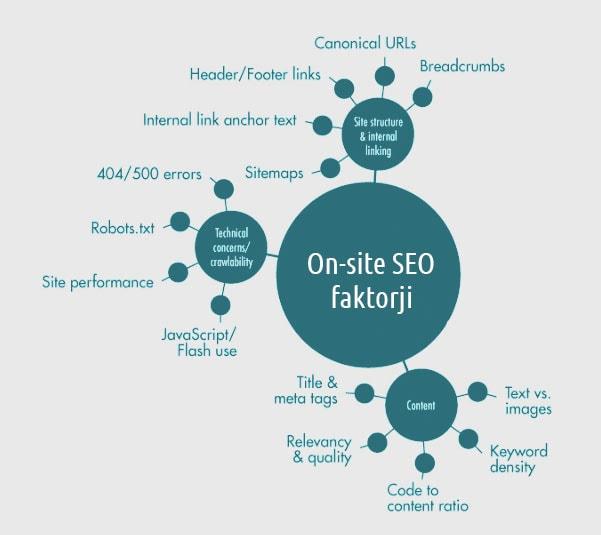
Which page elements affect on-site optimisation?
Individual elements affect a page’s ranking in search engines through different factors.
The most important on-site elements that affect a page’s position in Google:
- Page title
- URL
- Meta description
- Page content
- Search engine and user-friendly page
Find the SEO errors on your website!
A list of errors that keep Google from ranking you in the top positions.
How to find errors on your website
We identify on-site factors that hurt your website’s on-site optimisation with a website analysis. Using advanced tools and methods, we find errors on the website that hurt its search engine rankings. Based on the analysis, we prepare a report with instructions for fixing the errors so that your website or online store follows the recommendations of modern search engines.
Top 5 on-site elements that affect a website’s SEO
1. Page title
Title tags / Page title
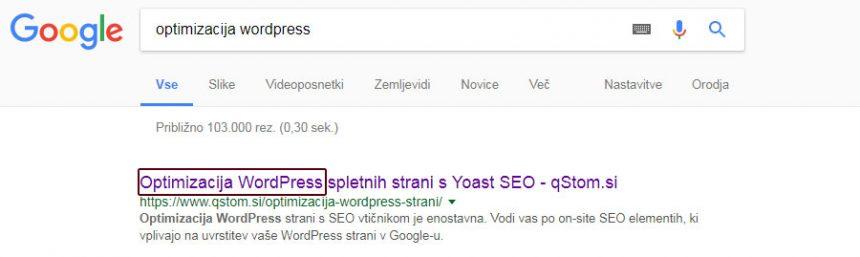
The title tag is the second most important element of a web page and defines the page title shown in Google. Because it is the most visible element in Google results, the way it is written matters a lot. The page title is very important for SEO. But remember: the main goal of a result shown in Google is to persuade target users to click the link to your page.
DO:
- Include the keyword in the page title, but keep it an accurate and concise description of the page content.
- Put the keywords you want to rank for at the beginning of the title.
- If you have a well-known brand, add it to the page title. This will increase your CTR (the ratio between impressions and clicks).
- Google shows the first 50–60 characters of the page title, so don’t make it too long.
- Every page should have a unique title.
- To preview how your page title looks in Google, you can use the Moz Title Tag tool.
DON’T:
- Avoid titles that list keyword phrases or their variations. Such titles don’t tell users what the page is about, which lowers the page’s CTR (click-through rate).
- The page title should match the page content. The content should be well written, so that users find the information the page title (title tag) promises them.
2. URL
URL
The URL is the location of a web page that you type into the browser’s address bar. URLs are usually structured to form a tree of pages and subpages or categories. Search engines most often show the page URL below the page title (title tag) and above the page description (meta description).

DO:
- Include the keyword in the page URL.
- The URL should be meaningful, readable and up to 5 words long (less than 90 characters).
- Use URLs to build a category/subcategory/product structure.
- Use canonical links if the same page can be reached through two or more different URLs.
DON’T:
- Page URLs should not contain diacritics or special characters.
- Don’t use spaces in URLs. Replace them with “-” or “_”.
- If a page is already indexed by search engines (Google) or has good inbound links (links from other sites), don’t change its URL without proper 301 redirects.
3. Meta descriptions
Meta description
The meta description is an HTML attribute that gives search engines a concise summary of the page content. Search engines show it below the page URL, so it matters for SEO and for increasing CTR.
Example of page code with a meta description:

DO:
- Include the keyword in the meta description.
- The optimal length of the summary is between 140 and 160 characters.
- Summaries should be meaningful, descriptive and match the content of the page.
- Write an enticing meta description and include a call to action: it is written for users, not for Google.
- To write a meta description, you can use a SERP tool.
- If your site runs on the WordPress CMS, use the Yoast SEO plugin.
DON’T:
- Don’t list keywords in the meta description.
- Meta descriptions must be unique.
- Since September 2009, Google has not used the meta description or meta keywords directly in its ranking algorithm.
4. Page content
Page content
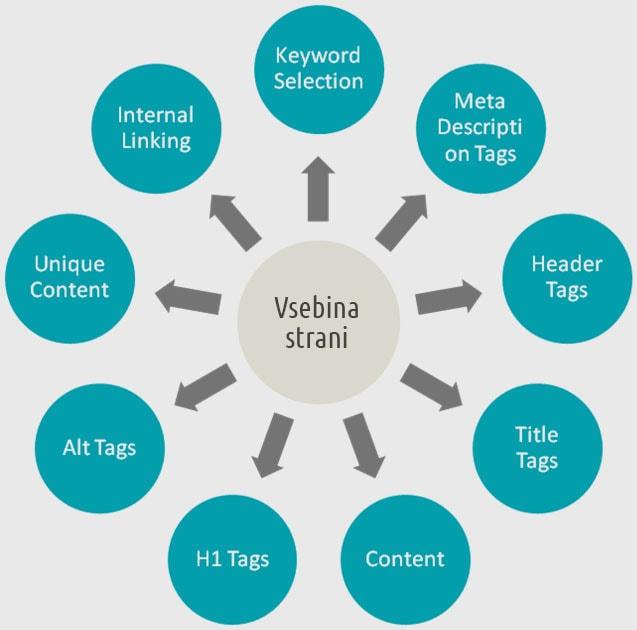
Google wants to offer users the highest-quality content for their search query. The only way to achieve this is high-quality, sufficiently comprehensive and user-friendly website content.
Website content is the foundation of a successful online business through content marketing. A content marketing study by HubSpotfound that more than 75% of online consumers look up information about a business or product through content articles. You have surely heard the phrase: “Content is king.” Your website should publish content that encourages visitors to browse your site and increases their interest in your service or product.
DO:
- Content should be high quality and easy to read on all devices (responsive and mobile-friendly).
- A page should have between 2,500 and 3,000 words of content.
- Create internal links.
- Add target=”_blank” to links to other sites (another domain), so the page opens in a new browser window.
- Use the H1 HTML tag.
- Write 3–5 relevant subheadings with the H2 HTML tag.
- Include optimised images with keywords in their file names and ALT attributes in the HTML code.
- Include the keyword in the first paragraph (100–150 words).
- Page loading speed is very important.
DON’T:
- There can be only one H1 heading.
- Don’t force keywords into every H1 and H2 heading.
- Don’t repeat keywords in the page text.
- Page content should be unique (don’t copy content from other sources, because Google compares them, including PDFs and pages written in other languages).
- Check the links on your page regularly to avoid 404 errors.
- Don’t add links to pages that aren’t relevant to your content or that Google rates poorly (Page Authority and Domain Authority).
5. Search engine and user-friendly page
Search engine friendly / Mobile friendly
A website’s design and usability are the basic factors that affect the visitor’s user experience and how well search crawlers can index it. With its crawlers, Google tries to determine how easily visitors can find what they are looking for on your site (what they typed into Google as a search query).
A user-friendly website adapts to the different screens and devices visitors use to browse your website. Responsive website design makes content easy to read on all devices, but grammar, layout and text structure also need attention: everything that affects clarity and how quickly information is taken in.
On phones, besides readability and adapted navigation, page loading speed is also very important. These factors strongly affect user experience and, consequently, the page’s bounce rate. Bounce rate is the ratio between visitors who leave the website without interacting and those who view other pages on your site. The higher the bounce rate, the lower your page will rank in search results.
A mobile-friendly website offers visitors a good user experience on mobile devices too. To persuade more website owners to build mobile-friendly sites, Google started ranking mobile-friendly pages higher than those not adapted to mobile devices. This rule applies to searches on mobile devices. Google’s next step toward a better user experience on phones was the AMP (Accelerated Mobile Pages) project. It is a special page format that Google stores directly on its own server network, so content can load up to 30 times faster than a classic web page.
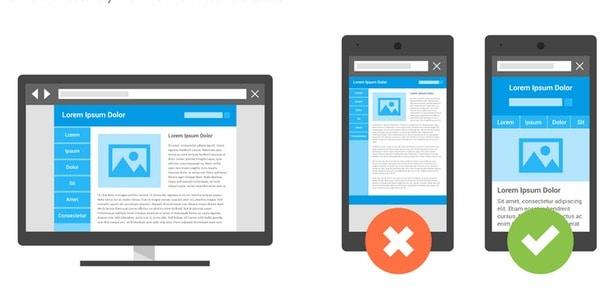
You can check how mobile-friendly your website is on the Mobile Website Testing Tool.
page. You can check whether your website also supports Google AMP on the AMP Test.